What’s the real cost of programming your cobot?
Collaborative robots have made automation accessible to companies that could never justify a full industrial robotics setup. But buying the robot is only step one. Turning a cobot into a working application — one that an operator can actually run on the shop floor — carries a second, often underestimated cost: programming and integration.
What it actually costs to program a cobot
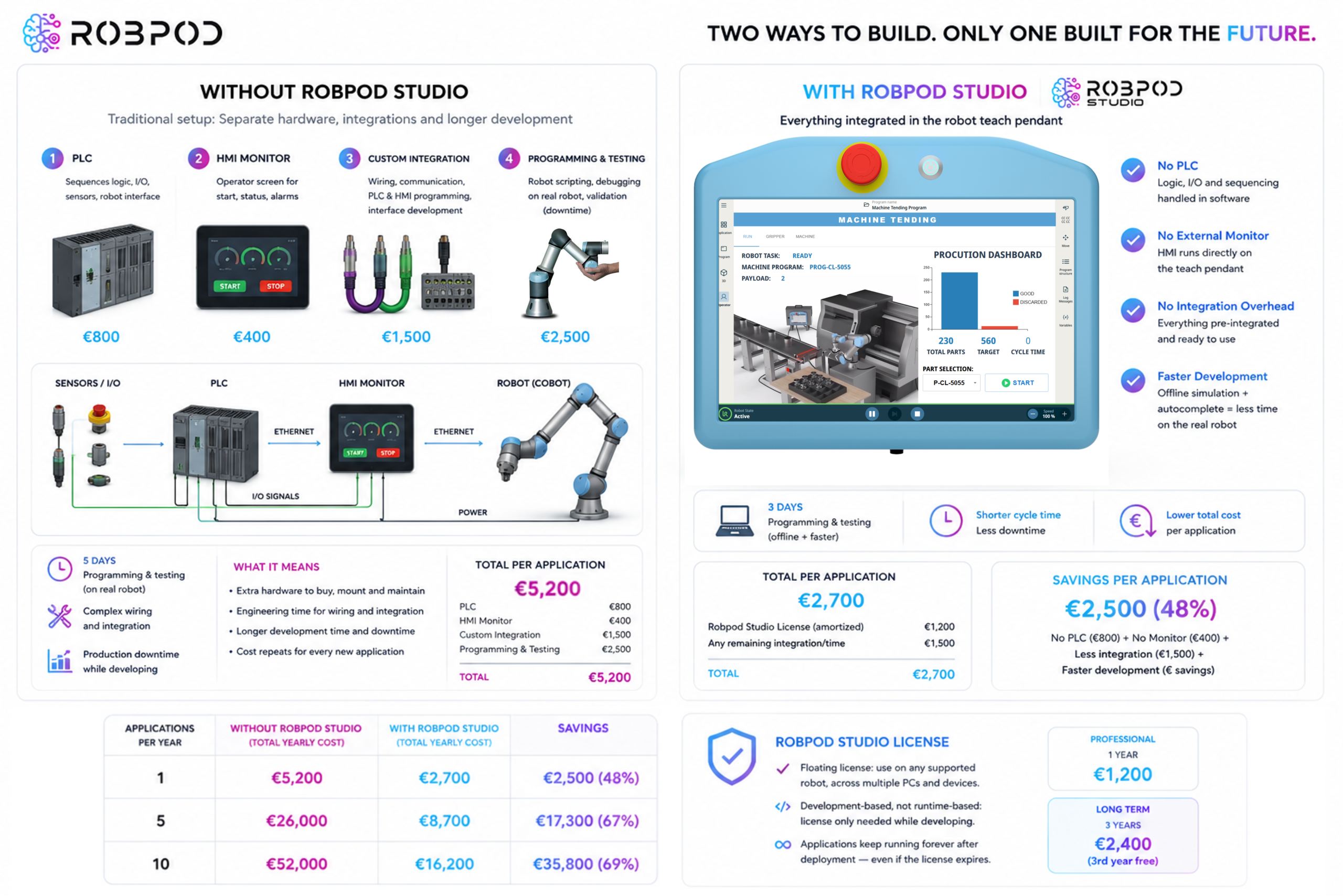
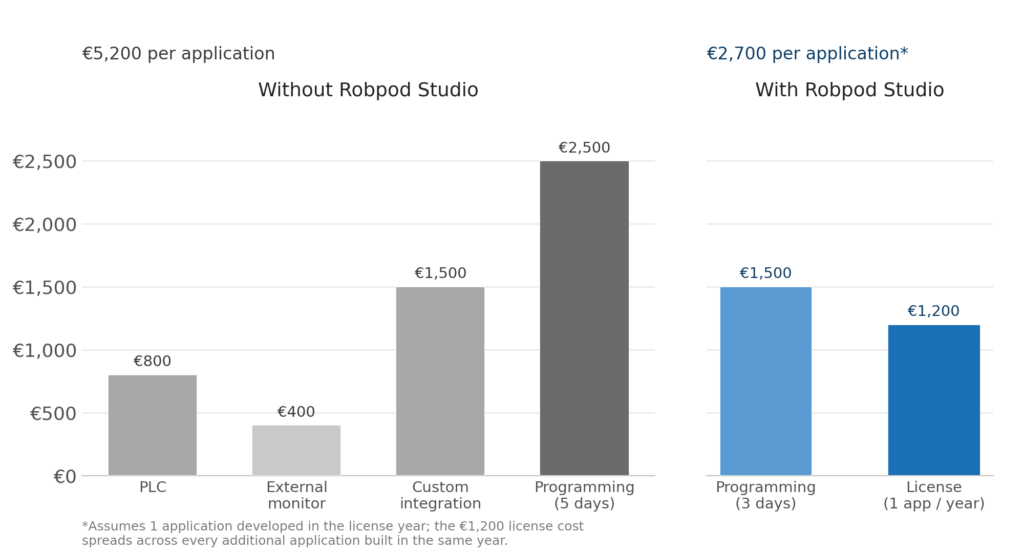
Every cobot application usually needs more than just a script telling the arm where to move. In a typical setup without a dedicated development environment, four cost items stack up:
- A PLC — most production cells still rely on a PLC to sequence machine logic, talk to sensors, and interface with the robot. A basic industrial PLC runs around €800.
- An external HMI monitor — operators need a screen to start cycles, see status, and handle alarms. A touch panel adds roughly €400.
- Custom integration work — wiring the PLC, the monitor, and the robot together, then building the operator interface from scratch, typically takes real engineering time on top of the robot programming itself. This is often the largest hidden cost, since it depends on the developer’s hourly or daily rate.
- Programming and testing time — writing the robot script, debugging it, and validating it on the physical machine. Without an offline simulator, most of this happens on the real robot, which also means production downtime while the cell is unavailable for actual work.
Put together, a single application can easily cost several thousand euros before it ever picks up a part — and that cost repeats for every new application a company develops.
Introducing Robpod Studio
Robpod Studio is an Integrated Development Environment built specifically for Universal Robots and Doosan Robotics, designed to remove most of that overhead. It’s built on the familiar PyCharm platform, so the interface will feel immediately recognizable to anyone who has worked with a modern code editor, but every feature is tailored to cobot development.
Key features
- Advanced scripting with live autocomplete and AI suggestions. Robpod Studio understands the UR scripting language and suggests completions as you type, cutting down the time spent looking up syntax or writing boilerplate motion and I/O code.
- HMI Designer. This is the feature that eliminates the PLC and external monitor. Robpod lets you drag and drop UI components to build a custom operator interface that runs directly on the robot’s own teach pendant — no external screen, no separate control hardware, no PLC required to drive it.
- Offline simulation. Applications can be built and tested in an integrated simulator before ever touching the physical robot. This means debugging happens on a laptop, not on the production floor, freeing up the real cell and shortening the overall development cycle.
- File synchronization. Code moves from PC to robot directly, without USB drives or manual file transfers, which removes a small but constant friction point during iterative development.
Where the savings come from
The savings break down into two distinct effects, and they compound.
Hardware and integration avoidance. Because the HMI runs on the teach pendant, there’s no PLC to buy, wire, and program, and no external monitor to mount and cable. For a typical application, that alone removes on the order of €2,700 in hardware and integration cost.
Faster development. Autocomplete reduces the time spent writing script by hand, and offline simulation means debugging no longer competes with production time on the physical robot. Even a conservative estimate — say, cutting programming and testing from 5 days down to 3 — turns a meaningful chunk of engineering cost into savings, and that time saving applies to every single application, not just the first one.
The combined effect scales with volume. A company developing one application a year already saves money by switching to Robpod Studio. A company developing five or ten applications a year multiplies both savings — the hardware/integration avoidance and the time savings — while paying for the license only once. In practice, the percentage cost reduction actually grows as more applications are developed per year, because the fixed license cost gets spread across more projects while the per-application savings keep adding up.
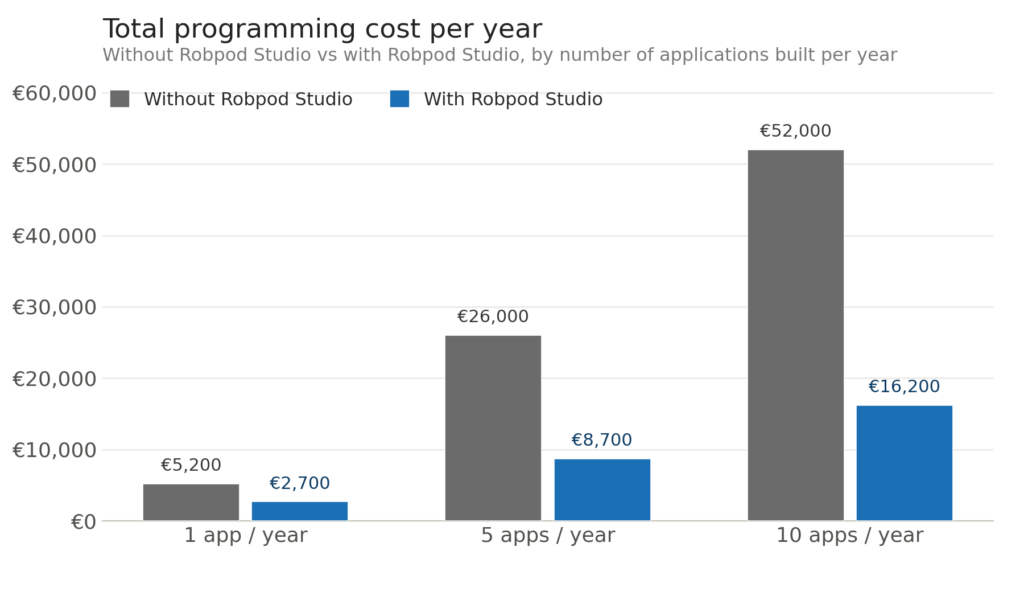
| Applications/year | Without Robpod Studio | With Robpod Studio | Savings |
|---|---|---|---|
| 1 | €5,200 | €2,700 | €2,500 (48%) |
| 5 | €26,000 | €8,700 | €17,300 (67%) |
| 10 | €52,000 | €16,200 | €35,800 (69%) |

The license model — and why it’s built to be convenient
Robpod’s pricing follows two ideas that are easy to overlook but matter a lot in practice:
It’s a floating license. During the validity period, a single license lets you program on any supported robot, across multiple PCs and devices, without seat-by-seat restrictions. A small team doesn’t need one license per developer or per machine — the license follows the work, not a specific installation.
It’s development-based, not runtime-based. This is the detail that makes the model genuinely convenient rather than just cheap. The license is only required while you’re actively developing an application. Once an application is finished and deployed, it keeps running indefinitely — even after the license expires. There’s no ongoing royalty, no runtime lock, and no need to renew anything just to keep existing applications working. Renewal only matters again when you want to develop something new.
The Professional license costs €1,200 for one year of full-feature access. A Long Term license extends that to three years for €2,400 — effectively giving a third year free compared to paying annually.
Because the license doesn’t gate what you’ve already built, it behaves more like a development tool subscription than a per-application royalty. Companies that develop a handful of applications per year get the full value of the license every time they open the IDE for a new project, without worrying about deployed robots suddenly needing a renewal to keep working.
The bottom line
Programming a cobot application the traditional way means paying for a PLC, a monitor, custom integration work, and development time — costs that repeat with every new project. Robpod Studio replaces the hardware and much of the integration work with a software feature (the HMI Designer running on the teach pendant), and shortens development time through autocomplete and offline simulation. Combined with a floating, development-only license that doesn’t affect applications once they’re deployed, the result is a cost structure that gets more favorable the more a company automates — turning what used to be a recurring integration expense into a single, predictable yearly line item.