Robpod Studio 1.3.6: Background Tasks Bring a Parallel Python Runtime to Your Robot
Release 1.3.6 introduces Background Task for Universal Robots and Doosan Robotics, plus a faster task-selection workflow on the Doosan teach pendant and a new license auto-deactivation option.
Background Task
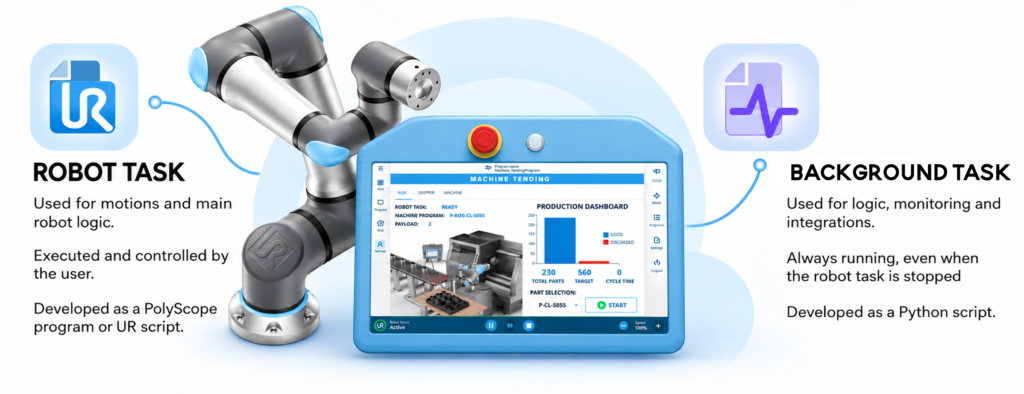
With new Robpos Studio release 1.2.6 Background Tasks can be developed and deployed. A Background Task is a standard Python script that runs in parallel with the main robot program, directly on the robot controller. It is available on both Universal Robots and Doosan Robotics.
It keeps running even when the main program is stopped, which makes it a good fit for:
🔌 Integrations
Call REST APIs, expose your own HTTP endpoints, send emails over SMTP, or connect to ERP/MES systems, all without touching your motion program.
🧠 Logic
Run supervision logic and state machines in parallel. Use the built-in rule scheduler (when / on) for clean, declarative logic: “when this condition is true, do that.” Need concurrency? Python threads are supported too. 🧵
📊 Monitoring
Read robot state, program state, TCP and joint positions, and digital/analog I/O around the clock. i.e Drive a signal tower based on robot status, or flag out-of-range positions. 🚦
🤝 Talks to your robot program
Exchange data with the main program via Modbus registers 🔄 or call Python functions in the background task straight from the robot program via XML-RPC. Example: the robot program asks the background task for the current job, updates the completed parts, and the background task syncs the result with your warehouse REST API. 📦
🛡️ Built for reliability
Error handling decorators like @loop and @retry keep your tasks resilient, so a transient failure doesn’t take your monitoring down.
A quick example
This task switches on an output while the robot is in emergency stop:
from robpod.background import *

wait_boot_completed()

while True:
    if get_state() == RobotStatus.EMERGENCY_STOP:
        set_digital_output(1, ON)
    else:
        set_digital_output(1, OFF)
    time.sleep(1)
To get started with Background Tasks:
- Check Quick Start instructions
- Deep dive in the Docs which are full of working examples to learn how to use the Background API
Doosan Robotics: select your task from the Robpod home screen
The second feature of this release targets the operator rather than the programmer.
The new Robpod app for the Doosan teach pendant now lets users select the task to run directly from the Robpod home screen, without opening the task editor. Previously, picking a task meant navigating into the editor. Now it is a single step from the home screen.
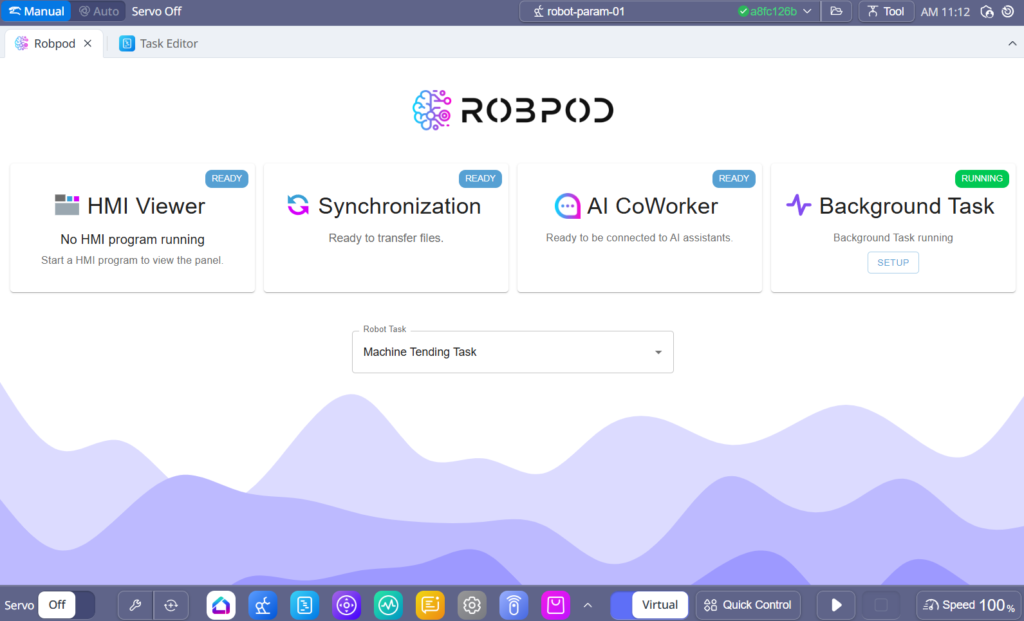
This is a small change with a real effect on the shop floor. Operators who change product or job several times a day get a shorter path and fewer opportunities for mistakes, and they never need to touch the programming environment. Programmers still work in the editor; operators work from the home screen.
License auto-deactivation: easier sharing of floating licenses
Release 1.3.6 also adds a small but practical option for teams that share a floating license: license auto-deactivation.
When the option is enabled, Robpod Studio automatically deactivates your Robpod license as soon as the application is closed. The license returns to the pool and can be used by someone else, with no manual deactivation step to remember. When you open Robpod Studio again, you can re-activate your license and continue working.
Why it matters: A license is no longer blocked because a colleague closed the application without deactivating it. Licenses are held only while Robpod Studio is actually open, which helps when several users share a limited number of seats
The option can be enabled from Robpod Studio settings panel.
Getting Started
Download latest release of Robpod Studio: https://www.robpod.cloud/#download